Every MT5 terminal.
One window.

Hangar is mission control for your MetaTrader 5 desk — live P/L on every account, one-click tool installs, a widget dashboard, news and the economic calendar. All in one place.

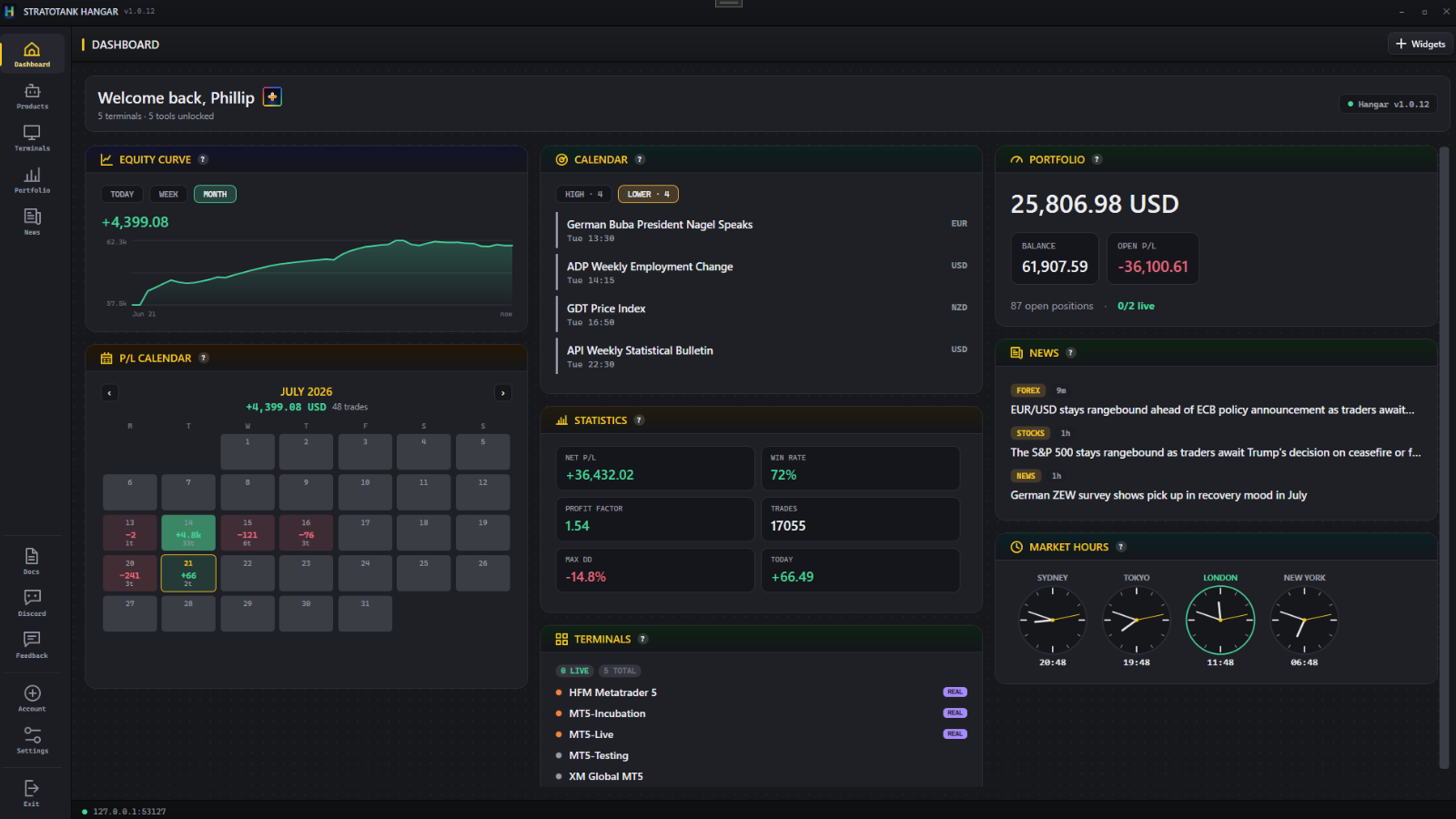
Dashboard: equity curve, P/L calendar, portfolio and news widgets

See everything

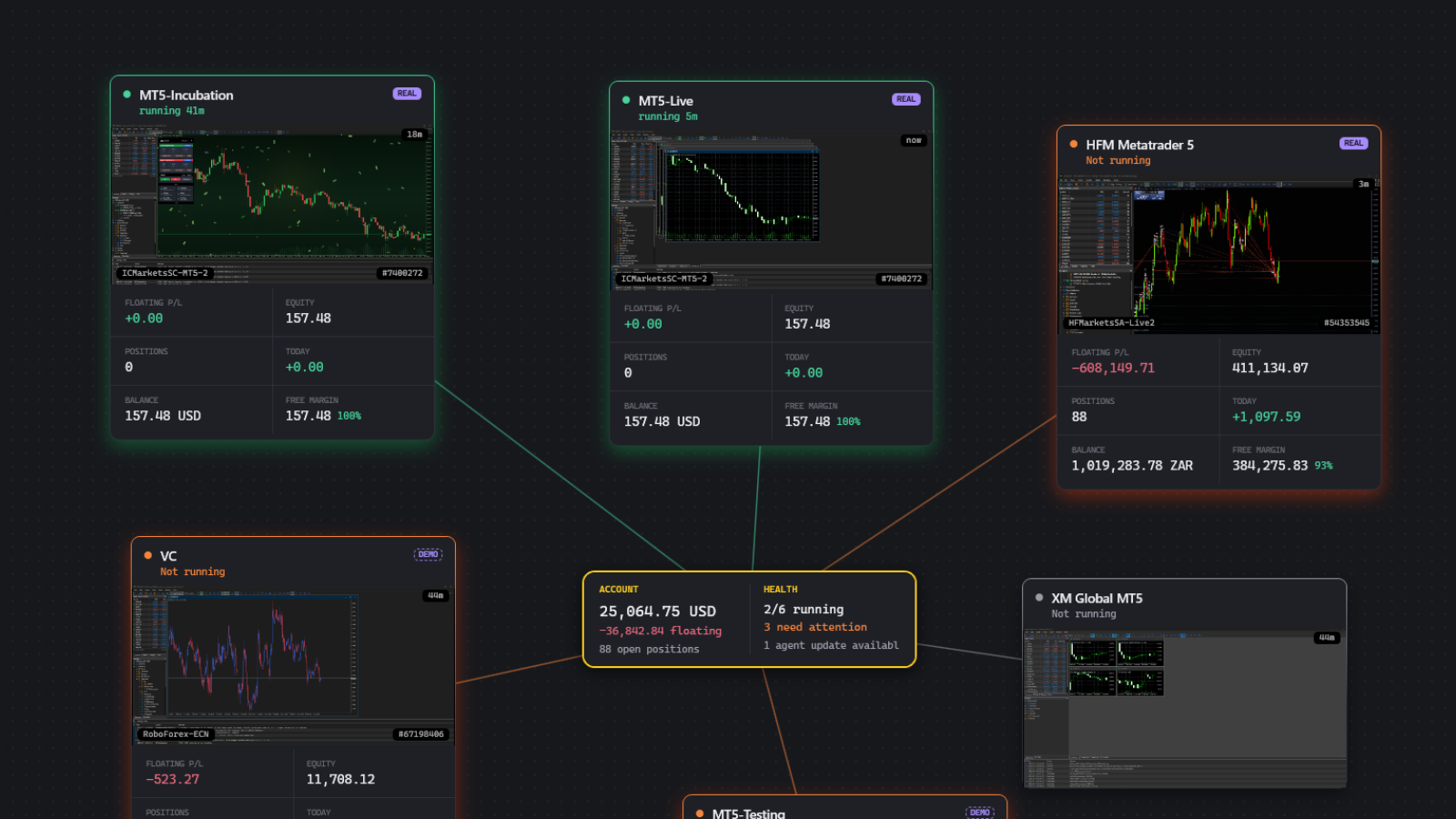
Manage every terminal from one place

Manage everything

Economic calendar and market news

Stay informed

Create your account. Download free.

100% free. No credit card required.

Free foreverMultiple terminals, nothing expires
Any brokerEvery MT5 terminal on your machine
Self-updatingInstall once, always current
Windows 10/11~80 MB, runs in the tray

Stop alt-tabbing through six terminals to find out how your day is going.

Every MT5 terminal is its own island: its own window, its own tools, its own version of everything. Hangar finds them all automatically and gives you one dashboard for the whole fleet — before your coffee is done brewing.

Dashboard

One board for your whole desk

Live widgets for portfolio equity, equity curve, P/L calendar, trading statistics, your terminal fleet, the economic calendar, market news and world market-hours clocks. Add, remove and rearrange them — your layout is saved.

PlusAdvanced Features - Pop any widget out into its own floating. Also tons of options per widget.

Dashboard widgets floating over a live chart
Customisable widget dashboard
Performance & Health

Know every account cold

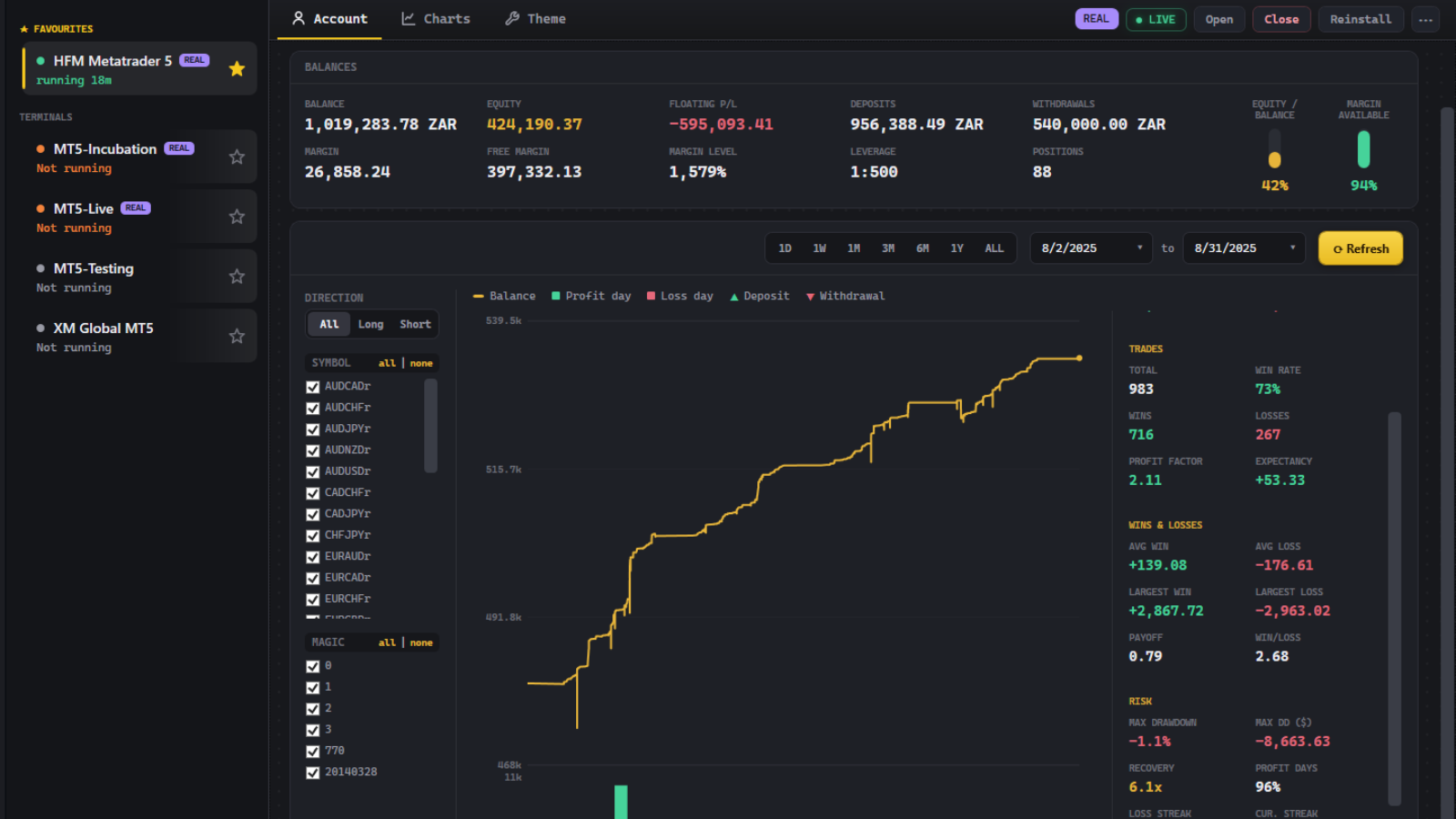
The health of every account at a glance — balance, equity, floating P/L, margin and leverage per terminal. Then the full performance breakdown: win rate, profit factor, expectancy, drawdown, streaks and payoff. Filter by symbol, magic number or direction, and drag the curve to zoom any date range.

Per-account performance breakdown
Account performance stats with balance curve
Tools

Install every tool in one click

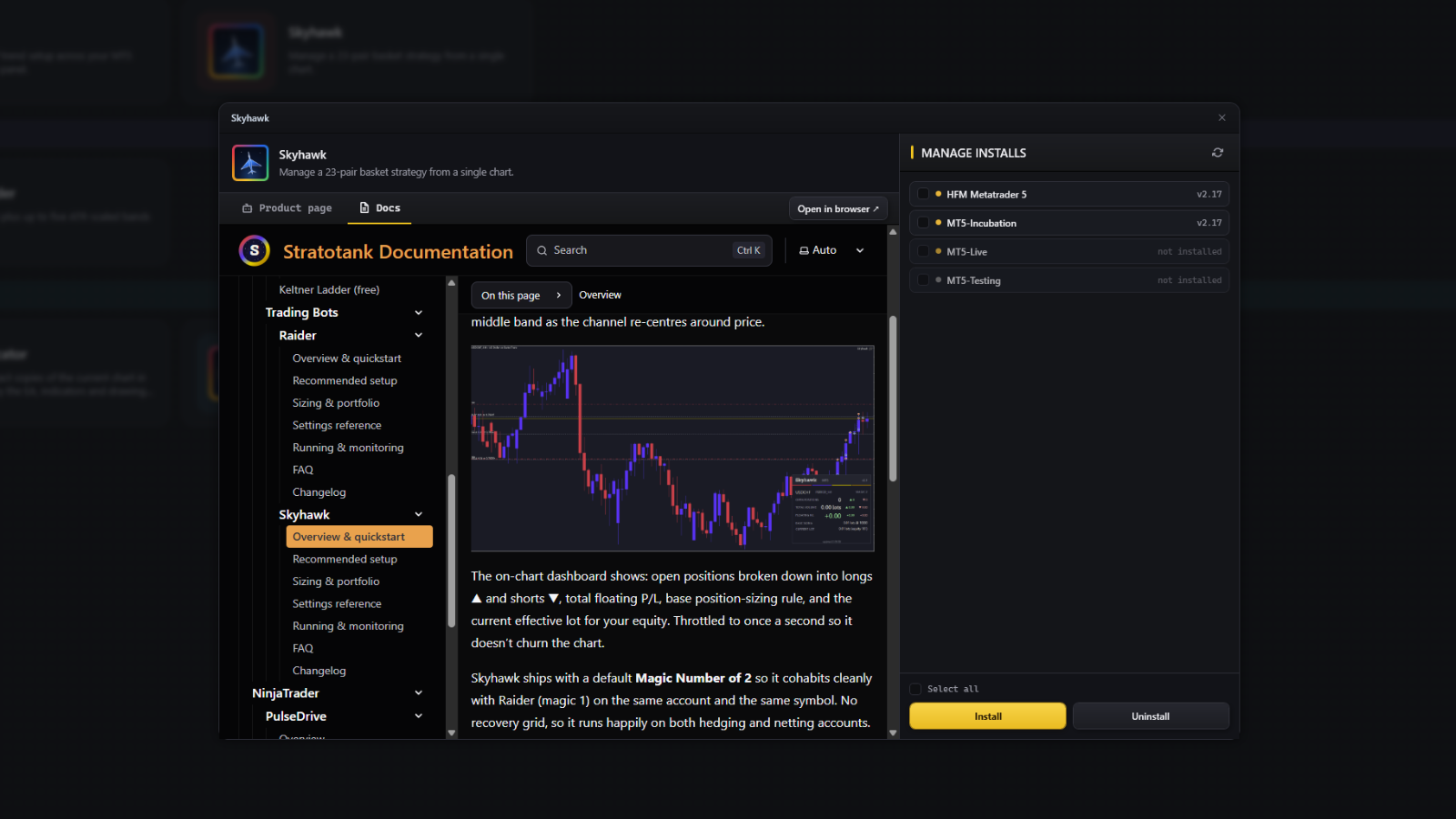
Add, update or remove any Stratotank tool on any terminal — or across the whole fleet from one pane. Hangar spots tools you installed another way and flags anything behind the latest version. No more copying files into data folders.

  • Expert Advisors (bots) — automated trend and basket strategies
  • Indicators — read structure and volatility on any chart
  • Tools & scripts — chart utilities and one-tap watchlist execution
Install a tool into your terminals, docs built in
One-click tool installs across terminals
Markets

News and the calendar, built in

A full economic calendar and live market headlines inside the launcher. Filter by impact, currency and day, switch between table and calendar layouts, and set your own timezone. No extra browser tabs.
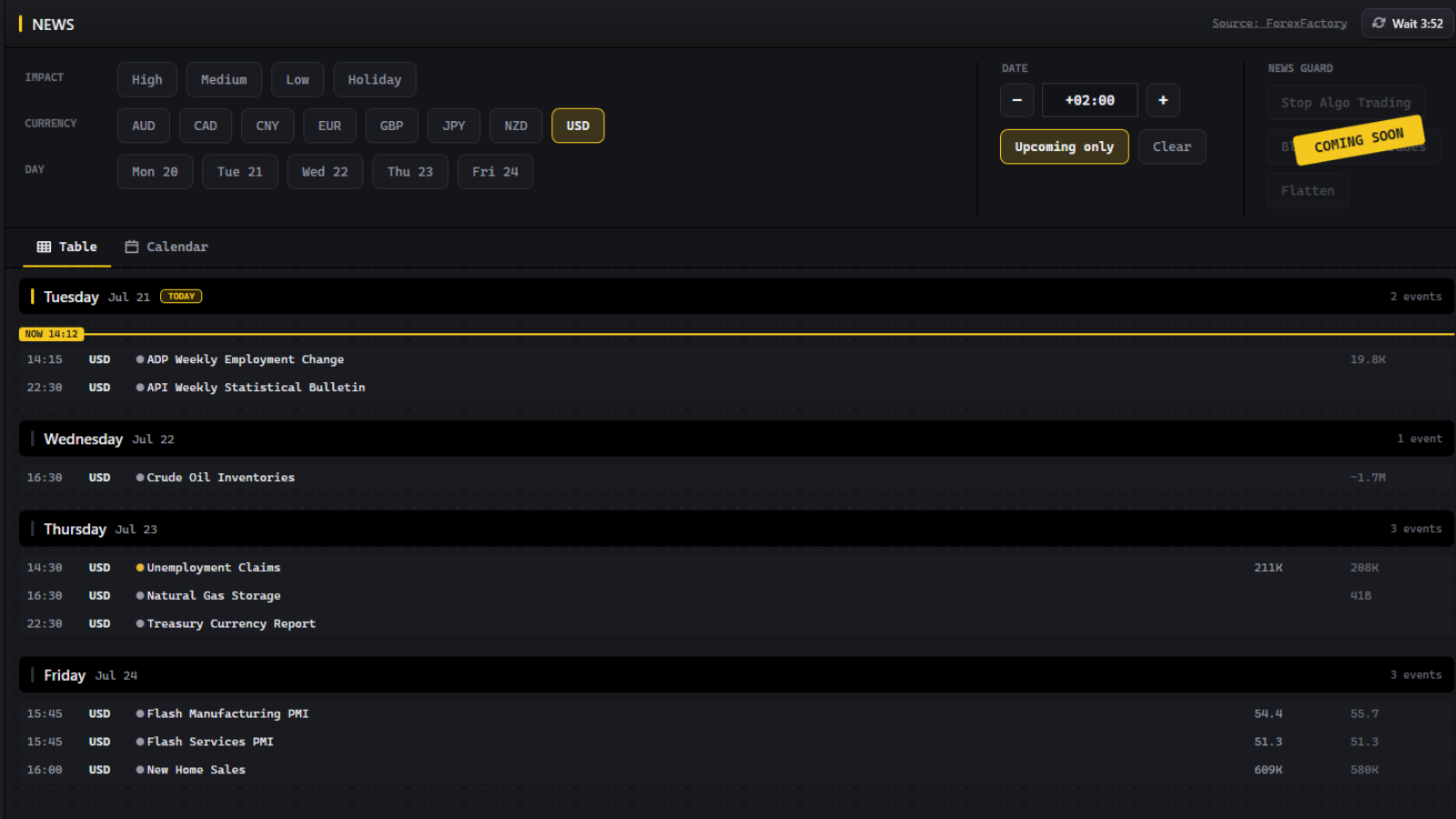
Coming soonNews Guard — pause your algos and flatten positions around high-impact news.

Economic calendar week view
Economic calendar and market news
Themes

Chart themes out of this world

MT5 gives you a colour picker from 2005. Hangar bolts a real theme engine onto it — a feature the platform simply does not ship:

  • One click, whole terminal
  • Beyond MT5's colour settings
  • Dollar Rain, Matrix, Starfield, Sunset & more — free
Chart themes applied to MT5

And the small stuff that adds up

All free. All in the box.

Fleet control

Open and close terminals from the launcher — open-all-favourites, close-all, and opening a running terminal raises its window instead of duplicating it.

Live status

Terminal status and uptime at a glance, REAL/DEMO badges, favourites, renaming, and auto-open on startup.

Remote chart control

See the charts open in each terminal and close any of them without touching that terminal.

Your currency

Pick your preferred currency and every account balance is converted for you.

Set and forget

Starts with Windows, lives in the system tray, updates itself, and shows a changelog on every update.

Offline-safe licensing

A local daemon keeps your Stratotank tools licensed while Hangar runs — with a 7-day grace period when you're offline.

Hangar comes with a real manual.

Not a README. A documentation site, written by the people who built the thing — and free to read before you download anything.

Set up, step by step

Install it, activate it and get it running on every terminal — with screenshots, not guesswork.

Every setting explained

What each input does, when to change it, and the values we run ourselves. Nothing left as a mystery.

Answers and changelog

The questions people actually ask, and a line-by-line record of what changed in every version.

Read the Hangar manual

Fair questions

Is it safe to run on my real desk?
Yes. Hangar runs real desks daily and it never touches your trades. It updates itself, so fixes and improvements land automatically without you chasing a download.
Is it actually free, or free-until-it-isn't?
Actually free. Hangar costs nothing, forever, for up to two terminals — which covers most desks. There's no trial timer and nothing expires. Plus exists for people running bigger fleets who want the extras; you never need it to keep using what's on this page.
Does it work with my broker?
Yes. Hangar works with any MetaTrader 5 terminal from any broker. It auto-discovers every MT5 installation on your machine — nothing to configure.
Can it touch my trades or my money?
No. Hangar reads account data (balance, equity, positions, history) through a lightweight service in each terminal to power the dashboards. It doesn't place, modify or close trades, and it never asks for your broker password.
Do I need an account?
Yes — that's the signup form at the top of this page. Your free Stratotank account links your terminals and keeps your tools licensed. It takes about 30 seconds and doesn't require a card.
Windows warned me about the installer. Should I worry?
No — the installer is code-signed by us, and the download always comes from our own CDN at cdn.stratotank.com. If SmartScreen still shows a caution while our signing reputation builds with Microsoft, click "More info" then "Run anyway".
What does it run on?
Windows 10 or 11. The download is about 80 MB and Hangar keeps itself up to date automatically — you install it once.

Your desk, in one window,
two minutes from now.

Sign up, download, and Hangar finds your terminals by itself. If it doesn't earn its place on your taskbar, uninstall it — it's free either way.

Get Hangar — Free

No credit card. 30-second signup, instant download.